Data wrangling for Aldus
We’ve been working at gathering a core bibliographic dataset for the Wosk-McDonald Aldine Collection at SFU. This is currently in the form of a big fat spreadsheet; we’ve been using notion.so[1] for this as it gives us both the big spreadsheet picture as well as individual views for each book. Right now we have about 25 fields for each title, and growing…
It occured to me that the spreadsheet data could be exported/translated into YAML metadata (to build web pages) pretty easily. YAML[2] (a minimalist metadata language that shares spirit with markdown) data is mostly just a set of key: value pairs in plaintext, so all we it needs is to pair up the column labels from the spreadsheet with the cell values, one batch of these per book (or row in the spreadsheet). Now, Notion will do that; you can export your data as a CSV file[3], but also as a set of individual markdown files in, essentially, YAML format.
Except Notion is commercial software, and we were using the ‘free’ tier, which of course isn’t ‘free’ because it has a bunch of arbitrary limitations on what you can do – in this case, because we had two of us collaborating on the project, it suddenly decided we couldn’t create anything more. I should have known this moment would come; it always does.
Thinking instead how I could turn the CSV data into YAML; there are lots of ways to do it: spreadsheet macros and Googledocs extensions, and of course python. Then I remembered OpenRefine,[4] which my friends Jon Bath and Graham Jensen had evangelized to me earlier this year. A quick download later[5], I imported my CSV spreadsheet in OpenRefine and explored its Export menu.
One of the exports in OpenRefine is called “Templater…” which, true to its name, provides a nice multi-pane interface for defining an export template and previewing what it’s going to come out like. The default template it starts you off with produces JSON output. Now, YAML is pretty close to JSON, differing mostly in punctuation (or lack thereof), so in a jiffy I was able to edit the default template so it produced YAML instead, mostly by deleting all the braces and quotation marks from the JSON template.
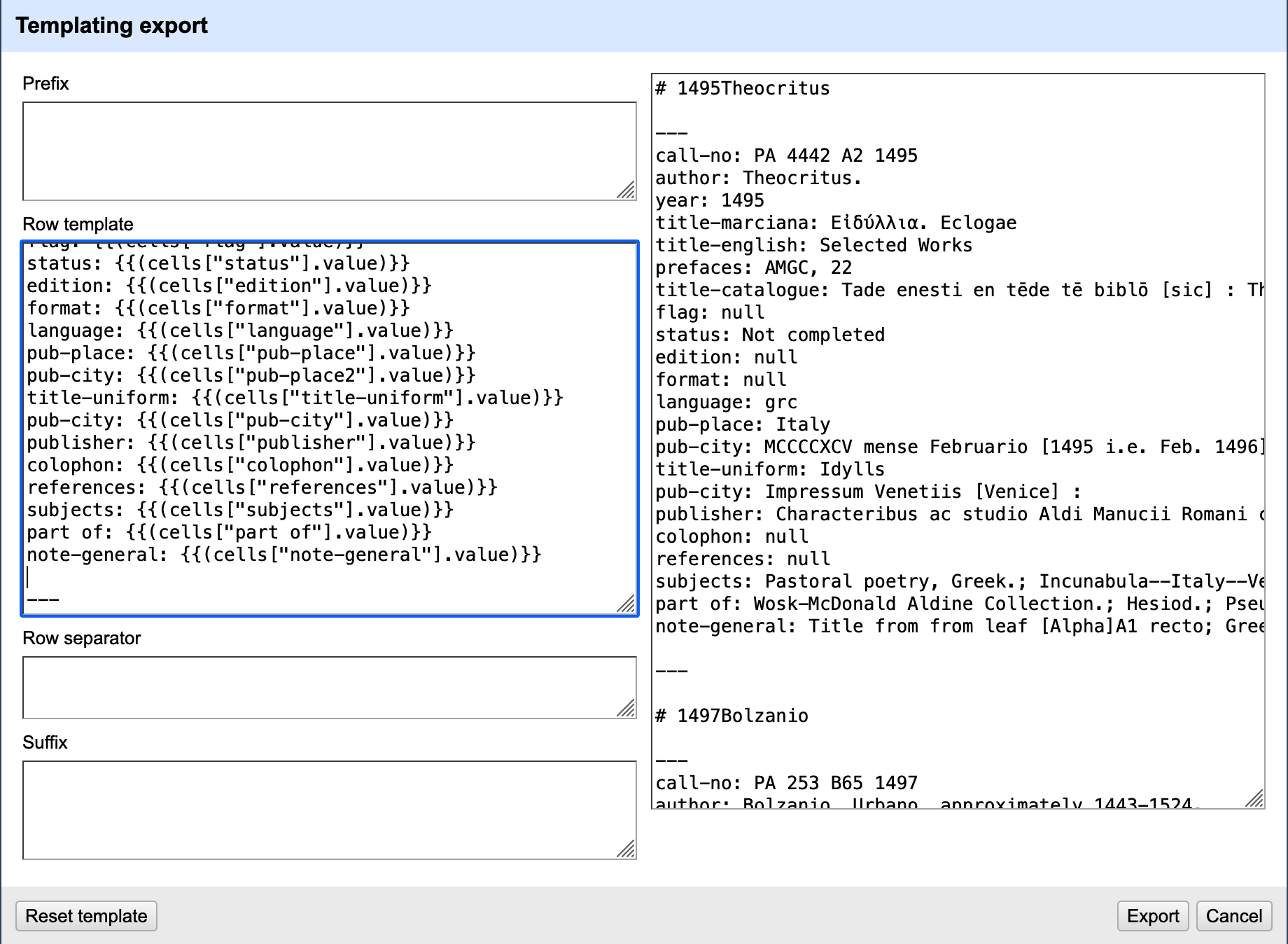
The resulting export gave me a text file with all the data from our big spreadsheet, as blocks of YAML. All I need to do now is split[6] this into individual files, and we’ll have starter templates for representing all the books in the collection on our website.
Did I mention OpenRefine is open-source software? I should. No arbitrary limits on what you can or can’t do; instead, transparent functionality. Nice.
https://notion.so runs as a native app or a web app: it gives you spreadsheet views or structured wiki views of your data (among other things like calendars), allowing you to very easily move back and forth between them, set up filters, temporary view templates, and so on. It’s a nice tool. It is, however, commercial software with various pricing tiers. Also it has an annoying “AI” button that silently mocks you when you work. ↩︎
YAML, which apparently stands for “YAML ain’t markup language,” is a dead-simple text representation of
key: valuedata pairs. It is supposed to be functionally equivalent to JSON (and therefore convertable back and forth), but with much less punctuation. YAML is very often found teamed up with markdown. ↩︎CSV or “comma-separated values” is the plain-text version of a spreadsheet; you can always export an Excel or Google Sheets doc to CSV for interoperability or for other text processing purposes. ↩︎
https://openrefine.org/ is an open-source tool for general purpose massaging of structured data – CSV, JSON, XML, etc. You install it as an app, but it works by spawning a local webserver on your computer, and opening itself up in your browser. You can then open up your data files and fiddle with them in its nice interface. ↩︎
NB: when I first tried to install OpenRefine, my Mac complained; apparently it isn’t fully ‘signed’ according to Apple’s security. You can bypass this by right-clicking on the icon and choosing “Open” from the menu rather than simply double-clicking. And after the first time, it opens fine. ↩︎
split, a Unix tool from the 70s, will split a text file into a collection of smaller text files: you pass it information about where you want it to split (after a number of lines, or every time a particular delimiter appears, or whatever). Don’t forget these old tools, kids! ↩︎